XML Core Workout
OxygenXML
XML NS
Xpath XSLT
+bonus rounds
Source:
https://github.com/lrzedzicki/xml-core-workout
Slides:
https://lrzedzicki.github.io/xml-core-workout/
Oxygen XML
https://is.gd/oxygenXML
------START-LICENSE-KEY------

Registration_Name=Lech Rzedzicki - training at Marklogic

Company=Kode1100

Category=Enterprise

Component=XML-Editor, XSLT-Debugger, Saxon-SA

Version=18

Number_of_Licenses=10

Date=10-24-2016

Trial=31

SGN=MCwCFH8MLltxrdHuNOvcgUb1tZxZAvnrAhRIx9rcfls5cxaxCSmkvKg/4ukl+Q\=\=

-------END-LICENSE-KEY-------
Exercise: Debug Xquery 1.0-ml
Exercise: explore support dump with Xpath
Exercise: debug XSLT
exercise: editing Markdown SME Guide
(optional): extract and parse support dump with Xproc
XML and Namespaces
Tim Bray W3C spec
-
Remember about the default namespace.
-
Prefix is not a namespace: dita:book≠dita:book
-
Define the namespace prefixes explicitly you can even use different prefixes for same NS (but don’t).
<a type="foo"
xmlns="http://t.com"/>
<?xml version="1.0" encoding="UTF-8"?> <root xmlns="http://test.com"> <a type="apple"> <id>123</id> <b>abc</b> </a> <a type="book"> <id>456</id> <b>def</b> </a> </root>
XPath and XSLT
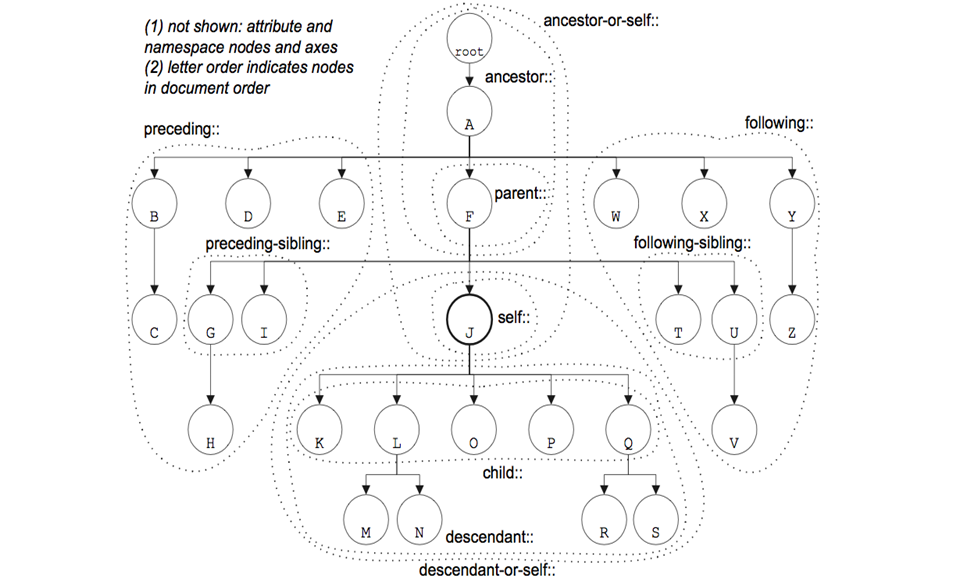
7 types of Nodes
- •Document
•Namespaces
•Elements
•Attributes
•Comments
•Processing-instructions
•Text
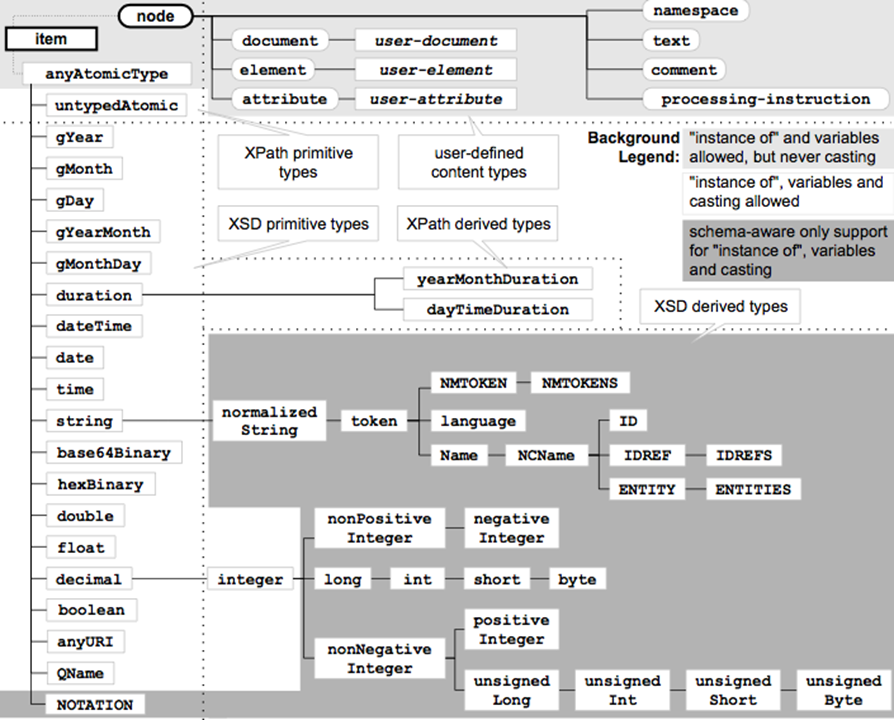
// any descendant

. Current node

* all/any elements

@* all attributes
.//title All <title> elements one or more levels deep in the current context.
*/* All grandchildren elements of the current context.
./*[local-name()='author'] use local-name to avoid NS issues

//p[@class="tags"][contains(.,'100')]
XSL in Marklogic
use xslt-eval or xslt-invoke in QConsole
let $xml := document {
  <doc>
    <p>sample</p>
    <test>
      <data/>
    </test>
  </doc>
}

let $xsl :=
  <xsl:stylesheet version="2.0" xmlns:xsl="http://www.w3.org/1999/XSL/Transform">
    <xsl:output method="xml" indent="no"/>

    <xsl:template match="test">
      <new-element>
        <xsl:apply-templates select="@*|node()"/>
      </new-element>
    </xsl:template>

    <xsl:template match="data"/>

    <xsl:template match="@*|node()">
      <xsl:copy>
        <xsl:apply-templates select="@*|node()"/>
      </xsl:copy>
    </xsl:template>

  </xsl:stylesheet>

return xdmp:xslt-eval($xsl, $xml)
Regular Expressions
grep "forest-name" Support-Request.txt | sed -e 's/^[ \t]*//' | sort | uniq
grep "problem-string" ErrorLog.txt | sed "s/^.*.xqy: //g" | sort | uniq

(©ableasdale 2012-13)
Anchors
^
Start of string, or start of line in multi-line pattern
\A
Start of string
$
End of string, or end of line in multi-line pattern
\Z
End of string
\b
Word boundary
\B
Not word boundary
\<
Start of word
\>
End of wordCharacter Classes
\c
Control character
\s
White space
\S
Not white space
\d
Digit
\D
Not digit
\w
Word
\W
Not word
\x
Hexadecimal digit
\O
Octal digitAssertions
?=
Lookahead assertion
?!
Negative lookahead
?<=
Lookbehind assertion
?!= or ?<!
Negative lookbehind
?>
Once-only Subexpression
?()
Condition [if then]
?()|
Condition [if then else]
?#
CommentQuantifiers
*
0 or more
{3}
Exactly 3
+
1 or more
{3,}
3 or more
?
0 or 1
{3,5}
3, 4 or 5
Add a ? to a quantifier to make it ungreedy.Escape Sequences
\
Escape following character
\Q
Begin literal sequence
\E
End literal sequence
"Escaping" is a way of treating characters which have a special meaning in regular expressions literally, rather than as special characters.Common Metacharacters
^
[
.
$
{
*
(
\
+
)
|
?
<
>Special Characters
\n
New line
\r
Carriage return
\t
Tab
\v
Vertical tab
\f
Form feed
\xxx
Octal character xxx
\xhh
Hex character hhGroups and Ranges
.
Any character except new line (\n)
(a|b)
a or b
(...)
Group
(?:...)
Passive (non-capturing) group
[abc]
Range (a or b or c)
[^abc]
Not (a or b or c)
[a-q]
Lower case letter from a to q
[A-Q]
Upper case letter from A to Q
[0-7]
Digit from 0 to 7
\x
Group/subpattern number "x"
Ranges are inclusive.Pattern Modifiers
g
Global match
i *
Case-insensitive
m *
Multiple lines
s *
Treat string as single line
x *
Allow comments and whitespace in pattern
e *
Evaluate replacement
U *
Ungreedy pattern
* PCRE modifierString Replacement
$n
nth non-passive group
$2
"xyz" in /^(abc(xyz))$/
$1
"xyz" in /^(?:abc)(xyz)$/
$`
Before matched string
$'
After matched string
$+
Last matched string
$&
Entire matched string
Some regex implementations use \ instead of $.Exercise: extract XML from support dump
Bonus: XProc
XProc is good for:
validation
XSLT / Xquery
splitting
adding namespaces
filtering
adding UUID attributes
HTTP requests
XInclude processing
... and much more
This pipeline takes a an input document and outputs it. Not very useful but it is the simplest pipeline we can build.
<p:declare-step xmlns:p="http://www.w3.org/ns/xproc"
 version="1.0" name="pipeline">
  <p:input port="source"/>
  <p:output port="result">
    <p:pipe port="result" step="output-input"/>
  </p:output>
 <p:identity name="output-input">
  <p:input port="source">
     <p:pipe port="source" step="pipeline"/>
   </p:input>
  </p:identity>
</p:declare-step>
We declare the XProc namespace, the XProc version and we name our step. Steps do not always need to be named but life will be simpler if you do. If you name it you can refer to it and any error messages you might receive will be considerably easier to understand.
<p:declare-step xmlns:p="http://www.w3.org/ns/xproc"
  version="1.0" name="pipeline">
    …
</p:declare-step>
An input defines an input port. You can think of a port as a location to which something can be connected. Content is supplied to a step via an input port. Ports are named using the port attribute.
Input ports can be connected to things
This port is connected to an external document using p:document.
<p:input port="source">
  <p:document href="input.xml"/>
</p:input>
p:input
<p:input port="source">
  <p:pipe port="source" step="pipeline"/>
</p:input>
we can connect steps together using the p:pipe element. This allows us to be connect the output of one step to the input of another
p:pipe
<p:output port="result">
  <p:pipe port="result" step="output-input"/>
</p:output>
p:output defines an output port. The results of steps are accessed through output ports. Output ports can be set up in much the same way as input ports. However, static documents and inline documents are generally not much use on output. Normally we would want to process the output of computation.
p:output
<p:declare-step xmlns:p="http://www.w3.org/ns/xproc"
                version="1.0" name="pipeline">

  <p:input port="source" sequence="true"/>

  <p:output port="result">
    <p:pipe port="result" step="wrap-inputs"/>
  </p:output>

  <p:wrap-sequence name="wrap-inputs" wrapper="wrapper">
    <p:input port="source">
      <p:pipe port="source" step="pipeline"/>
    </p:input>
  </p:wrap-sequence>

</p:declare-step>
Combine multiple files
<p:pipeline name="my-pipeline">
  <!-- some steps -->
</p:pipeline>

It is exactly the same as:

<p:declare-step name="my-pipeline">
  <p:input port='source' primary='true'/>
  <p:input port='parameters' kind='parameter' primary='true'/>
  <p:output port='result' primary='true'/>
  <!-- some steps -->
</p:declare-step>
p:pipeline vs p:declare-step
<p:pipeline name="my-pipeline">
  <!-- some steps -->
</p:pipeline>

It is exactly the same as:

<p:declare-step name="my-pipeline">
  <p:input port='source' primary='true'/>
  <p:input port='parameters' kind='parameter' primary='true'/>
  <p:output port='result' primary='true'/>
  <!-- some steps -->
</p:declare-step>